Large restaurant groups handle thousands in daily purchases.
Without controls, high-value requests can slip through and blow budgets. Policy Approvals ensure that any Supplier/CK Orders or Requisitions above a set limit are reviewed by authorised staff before submission.
Benefit | What it means for you |
Prevent overspending | High-value requests cannot be submitted until reviewed. |
Customisable control | • One approver on Supplier & Central Kitchen (CK) Orders |
Fast decisions | Each approval e-mails (and deep-links) the next approver—no manual chasing. |
Real-time visibility | Banners show Pending X / Y Approvals; the Applied Policies drawer lists every limit in play. |
Full traceability | Audit log records who drafted, approved, rejected, or submitted and when. |
User presses Submit Order.
If the total exceeds a policy limit:
Order is saved as Draft.
Assigned approver receives an email, that contains a link to the website/app.
Requester sees “Limit Reached – Awaiting Approval”.
Approver chooses:
Approve → Order status Approved (still needs Submit).
Approve & Submit → Order sent immediately.
Reject → Order blocked.
Step | What happens |
Create / edit any requisition | Supy groups requisitions by Location + Delivery Date + Status and recalculates the group total. |
Total breaks a policy | The policy with the highest limit breached sets an approval ladder (1-5 levels). |
First-level approvers notified | Email + in-app link to the grouped requisition view. |
Approvals progress |
|
All levels approved | Group moves to Approved; Process button appears. |
Requisitions edited mid-flow | Policies are re-checked. If a different (higher) policy now applies, ladder resets; all changes are logged. |
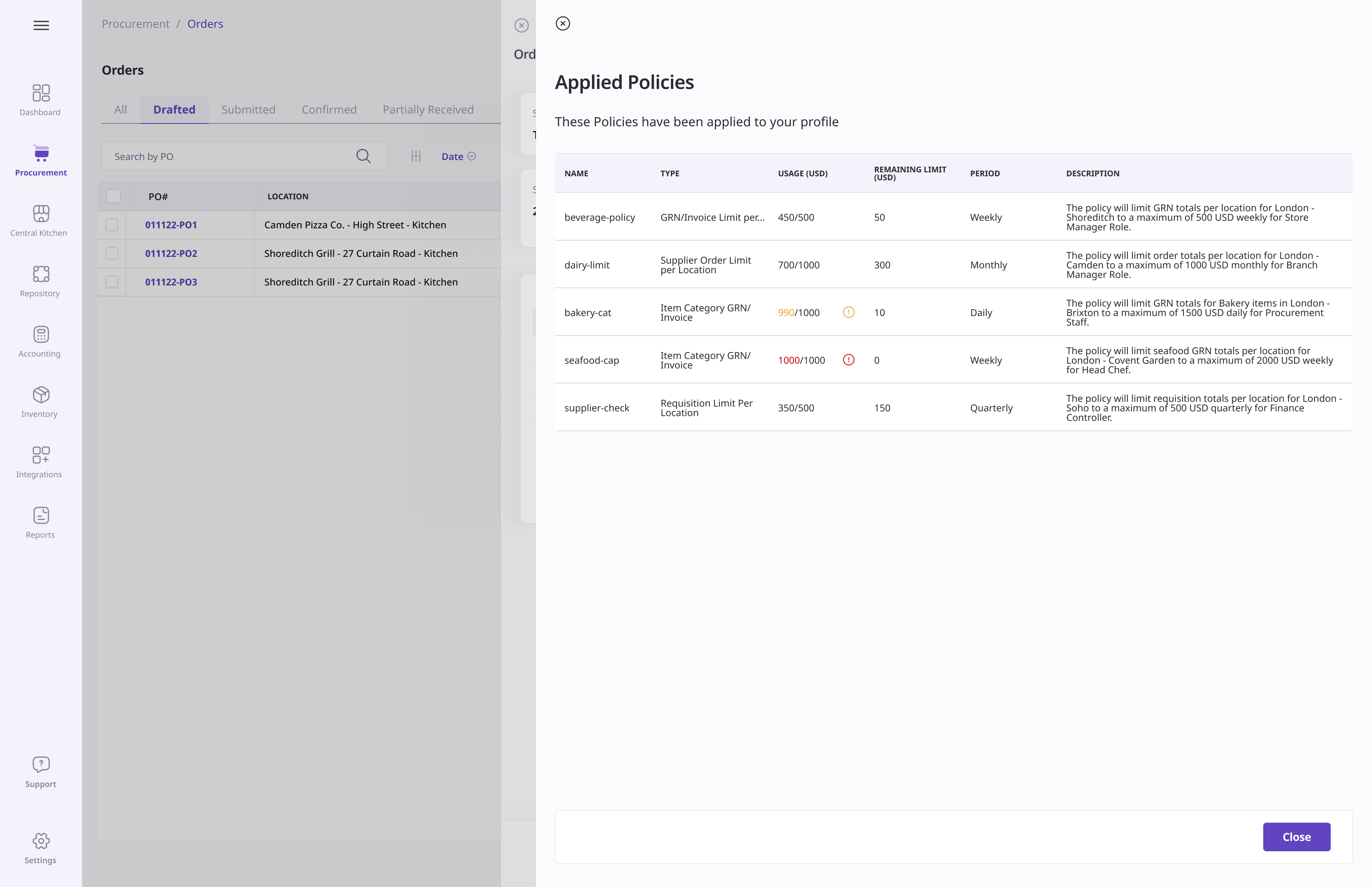
Available on Place Order , Create / Update GRN , and Process Requisition views
One click opens a side panel showing, for the current action and user:
Policy name & type
Budget used / remaining
Reset period (e.g., weekly, monthly)
Policy description
Use it to check limits that could affect you before you submit.
Supy now records:
Who drafted, approved (and which ladder level), rejected, or submitted.
When each action occurred.
Which policy triggered the approval flow and any ladder changes.
These entries provide a complete timeline for internal reviews and external audits.
Limit Supplier or CK Orders over an internal spending cap.
Limit Requisitions that combine many items and push totals above budget.
Brands that need multi-level sign-off (e.g., Head Chef ➜ Ops Manager ➜ Finance Controller).
Go to Settings → Policies.
Edit or create a policy.
Orders → pick one approver (user or role).
Requisitions → build a ladder (up to 5 levels).
Make sure approvers are not in roles restricted by that policy.
Confirm email notifications are enabled for all approvers.
 Tip: Need temporary cover? Add a backup approver role or update the ladder at any time.
Create an Order or Requisition as usual.
If limits are breached, Supy shows “Limit Reached – Awaiting Approval” and saves a draft. This sends out email notifications in the background to the applicable users.
Receive email + in-app link.
Review details, then:
Reject → draft is blocked.
Approve → status Approved (Requester can submit).
Approve & Submit → request sent immediately.
Next-level approvers are notified automatically (Requisition ladder).
Open the record → Audit Log tab for a full timeline of actions.
Budget Protection – High-value requests can’t bypass review.
Operational Flow – Higher approvers can fast-track urgent spending.
Clear Visibility – Banners and the drawer show exactly which policies apply.
Complete Traceability – Every step captured for audits and reporting.
 Policies are enforced only for users assigned to custom roles (default roles are not restricted), while approvers can belong to any role - custom or default.
Procurement Admins: Configure policies and select approvers.
Requesting Users: Create orders/requisitions and monitor their status.
Approvers: Review, approve, reject, or fast-track requests
Finance / Audit Teams: Review audit logs and policy compliance.
What if my order is only slightly over the limit?
The same approval flow applies. Consider reducing quantities or asking an admin to adjust limits.
Can a higher manager approve even if earlier levels haven’t?
Yes. Higher-level approval auto-completes lower levels to prevent bottlenecks.
Where can I see who approved my request?
Open the order or requisition and scroll to the Audit Log tab. Every action is time-stamped.
What if there are multiple policies that apply to me?
If more than one policy of the same type (e.g. Supplier Order Limit Per Location) applies, Supy uses the one with the highest limit (and its approvers). For multiple policies of different types, all policies and approvers are applied.
Role | Permissions/Settings Required |
Policy Configuration | Administration → Permission Policy |
Approvers |
|
Requesters |
|
Key Benefit: Policy Approvals let staff request what they need while managers keep spending on target - protecting margins without adding paperwork.